clabgen
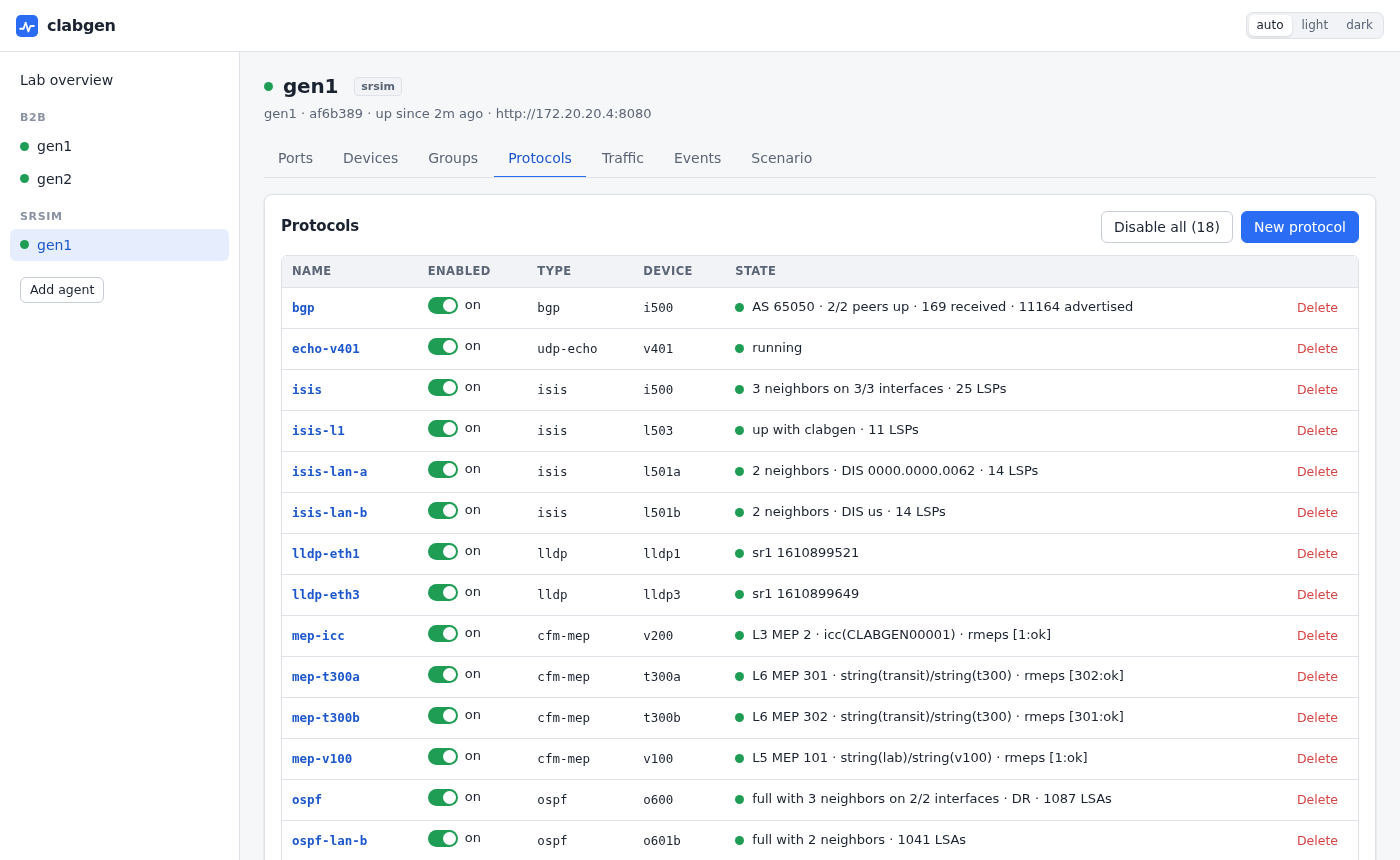
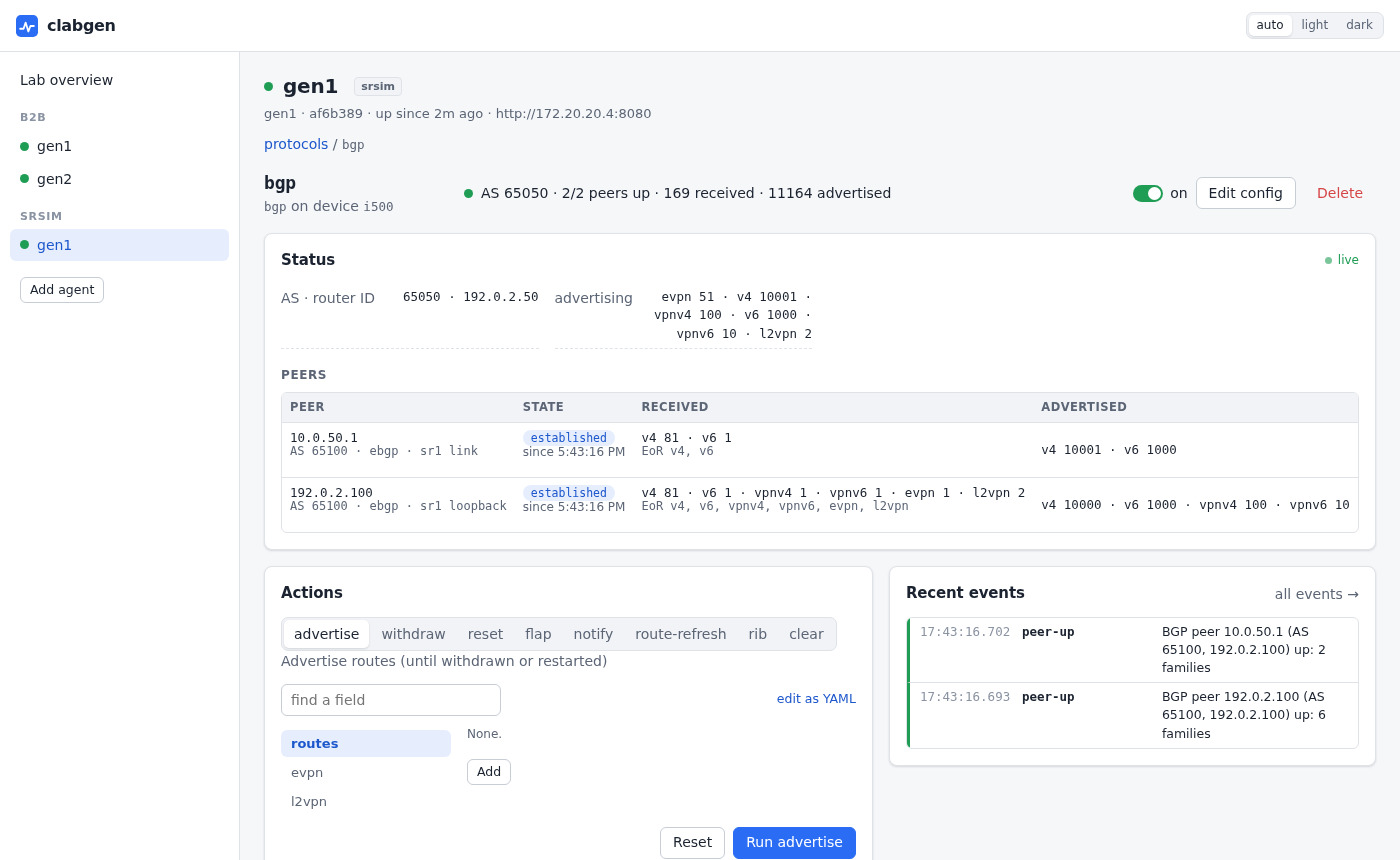
A web UI for emulating protocols and generating traffic in containerlab labs, aimed at control-plane testing: build emulated routers, MEPs and traffic endpoints, watch their state live, and break them on purpose. A small agent runs as a clab node, takes over the node's data interfaces and emulates endpoints on them.
Quick start
Add clabgen nodes to a topology:
name: demo
topology:
  nodes:
    gen1: {kind: linux, image: ghcr.io/ripnet/clabgen, binds: [".:/clab"]}
    gen2: {kind: linux, image: ghcr.io/ripnet/clabgen, binds: [".:/clab"]}
  links:
    - endpoints: [gen1:eth1, gen2:eth1]
containerlab deploy -t demo.clab.yml
Start the UI once per lab host; it finds every clabgen node in every running lab:
docker run -d --name clabgen-ui --network host --restart unless-stopped \
  -v /var/run/docker.sock:/var/run/docker.sock ghcr.io/ripnet/clabgen-ui
Open http://127.0.0.1:8090 (from a laptop: ssh -L 8090:127.0.0.1:8090
labhost). The agents start empty: add devices and protocols in the UI,
or load a scenario file at startup. What you
build is saved in clab-demo/<node>/clabgen.yml (that's the .:/clab
bind) and comes back when the lab restarts. Two
complete labs are in examples/: two agents back to back
(b2b), and one against a Nokia SR-SIM router (srsim, which needs an
SR-SIM image and license).
Highlights
- Everything from the browser: a lab-wide view of every agent, live protocol status, and a config editor generated from each protocol's schema, with the changes reviewed before they are applied.
- Break things on purpose: flap adjacencies, withdraw routes, stop CCMs, inject CFM faults, silence BFD, restart gracefully, disable a protocol (or 20 random members of a group) and watch the device under test react.
- Scale: device groups of thousands of peers with stepped VLANs and addresses, emulated IS-IS and OSPF networks behind a router, route injection by the thousand.
- Measure and judge: traffic flows with loss, outages and RTT, and pass/fail limits on them shown across the whole lab ("every flow stayed under 50 ms of outage"); one-way stats on every device; Y.1731 delay and loss sessions in bins.
- Scriptable: the same things through
clabgenctl, an API, YAML scenarios, and a Python package with pytest fixtures for turning a lab into a test suite. - Kept across restarts: what you build is saved in the lab's folder
(
clab-<lab>/<node>/clabgen.yml) and restored when the lab comes back.
Features
- Devices: many emulated endpoints per port (MAC, VLAN or QinQ, IPv4/IPv6 answering ARP, ND and ping), and device groups.
- ETH-CFM / Y.1731: down MEPs with CCM and defects, loopback, linktrace, delay (DMM, 1DM), loss (SLM, LMM), test signal, AIS/LCK/CSF, proactive measurement sessions and fault injection.
- IS-IS: point-to-point and LAN, L1/L2, multi-topology, SR-MPLS, SRv6 and flex-algo, keychain authentication, BFD, graceful restart.
- OSPFv2 / OSPFv3: areas (stub, NSSA, virtual links), segment routing, BFD, graceful restart.
- BGP: IPv4/IPv6 unicast, VPNv4/v6, EVPN and L2VPN.
- Emulated topologies behind IS-IS and OSPF routers (grids, rings, custom graphs) with link and node failures.
- LLDP.
- Traffic flows: ICMP (ping or crafted packets), UDP, and raw L2 streams for testing circuits without an IP stack, one way or echoed.
- Packet capture: every frame the ports send and receive, live in the
UI (decoded, filtered, saved as pcapng, or rebuilt as a packet flow), in
clabgenctl capture, or straight in Wireshark: a plugin lists every agent's ports as capture interfaces. - Packet builder: frames of any layers (Ethernet, VLAN, MPLS, ARP, IPv4/6, UDP, TCP, ICMP, VXLAN, raw bytes) with every field settable, fields changed per packet (increment, random, lists), and pcap replay; a layered editor in the UI with a live hex preview.
Interop is verified against Nokia SR-SIM.
Intended use
clabgen is for lab and test networks. An agent takes over its node's interfaces and sends real protocol traffic (BGP updates, IS-IS and OSPF floods, CFM, traffic flows), and its API and UI have no authentication: keep it on lab networks, away from production ones.
Documentation
Also at https://clabgen.dev/.
- Web UI: the lab-wide UI and its options
- Configuration: scenario files, each protocol, device groups
- CLI:
clabgenctl - API
- Python and pytest: the
clabgenpackage - Development: building, tests, images and releases
- Writing a protocol
License
BSD 3-Clause; see LICENSE. Copyright (c) 2026, Tom Young and the clabgen contributors.